
Electrical Connections
| Wind Data Logger | Davis 7911 Wind Sensor | |||
|---|---|---|---|---|
| RJ-45 Pin | Standard Color | Function | Color | Function |
| 1 | Orange / White | Anemometer 0 | Black | Wind speed contact closure to ground |
| 2 | Orange | Anemometer 1 | ||
| 3 | Green / White | Anemometer 2 | ||
| 4 | Blue | Ground | Red | Sensor ground |
| 5 | Blue / White | 5 volts | Yellow | Pot supply voltage |
| 6 | Green | Wind Vane potentiometer 0 | Green | Wind direction pot wiper (360° = 20 kOhm) |
| 7 | Brown / White | Wind Vane potentiometer 1 | ||
| 8 | Brown | Ground | Not Used | |
Here is a diagram showing the connections that need to be made:
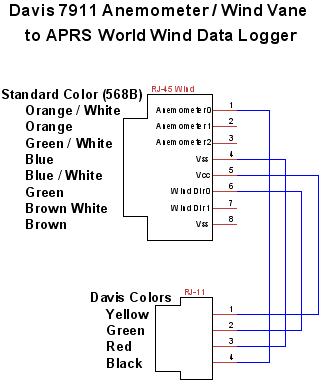
The connections can be made by removing one connector on a RJ-45 patch cord and removing the connector on the Davis sensor. You should then strip the jacketing back on both cables, being sure not to nick the insulation. You should then connect the orange white patch cord conductor to the black Davis conductor. The blue patch cord conductor should be connected to the red Davis conductor. The blue / white patch cord conductor should be connected to the yellow Davis conductor. The green patch cord conductor should be connected to the green Davis conductor.
Data Logger Setup and Calibration
Anemometer
Calibration information about the anemometer is not listed on Davis's website. EME Systems has a brief discussion of interfacing with the Davis 7911 sensor. It is available at: http://www.emesystems.com/OL2wind.htm#Annemometer. Based on EME Systems' information and communications with Davis's support the Wind Data Logger calibration values of anemo_m should be set to 2.2500 and anemo_b should be set to 0.0000 for miles per hour. Or when using our older style Wind Data Logger anemo_m should be set to 22500 and anemo_b to 0.
Wind Vane
To use the wind vane you should set the Wind Data Logger to use a "NRG" type wind vane. This is accomplished in the "Wind Vane Setup" menu.
![[Davis 7911 at APRS World's office]](../images/davis_office.600.jpg)
